
Picture this: You’ve built what you think is the next big thing in mobile apps. Your mom loves it. Your cat is indifferent. But your actual users? Well, let’s just say when you finally dare to check your app store reviews, it’s a rollercoaster—with a few loops too many. That, my friend, is why user testing isn’t just nice-to-have. It’s your sanity saver. In this post, you’ll get a hands-on, real-talk guide to mobile app testing that won’t put you (or your users) to sleep.
1. Preparing Your App Like It’s Going on a First Date (a.k.a. Test Strategy)
Let’s be honest: sending your app into the wild without a test strategy is like showing up to a first date in pajamas, clutching a bag of chips. Sure, you might be comfortable, but you’re not exactly setting yourself up for success. Before you even think about mobile app testing, you need to define your app’s big “why” and what your dream user is actually doing. Are they breezing through onboarding, or are they seconds away from hurling their phone across the room because “Submit” is playing hide-and-seek?
First, identify your goals. Are you launching something shiny and new, fixing those sneaky bugs, or just trying to make your app less confusing than your aunt’s Facebook posts? Write these goals down—even if you hate lists. (We all do. But trust me, your future self will thank you.)
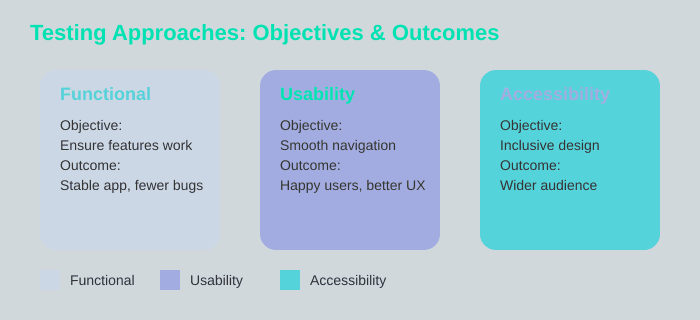
Next, it’s time to pick your testing approaches like you’re at a buffet. Functional testing covers the basics: does your app actually work, or is it just pretending? Usability testing is all about those “wow, that was easy” moments—because nobody wants to feel like they’re solving a Rubik’s Cube just to sign up. And don’t forget accessibility checks so everyone gets a seat at the table. Research shows that a solid test strategy, including these three pillars, is essential for top-notch app performance.
Quick story: I once skipped testing my app’s registration flow. Users had to scroll for miles to find the “Submit” button. Oops. After fixing it, my reviews soared faster than my caffeine intake on deadline day. Moral? Don’t assume you know what users want—test, test, and test again.
And here’s a wild card: imagine you’re a user named Sam. What would confuse or surprise Sam on their first try? If you’re not sure, ask someone who isn’t you. (Bonus points if they’re brutally honest.)
“A solid test plan is half the battle.” – Lisa Brown, Mobile UX Lead

2. The Art of User Recruitment (and Herding Cats)
Let’s be honest: user recruitment for user testing is a bit like herding cats—if the cats had opinions about your app’s font size and a suspicious amount of free time. But here’s the secret sauce: it’s not about grabbing just anyone off the street (unless your app is for street performers, in which case, carry on). It’s about finding people who actually represent your user demographics—the folks who will use, love, and sometimes break your app in the wild.
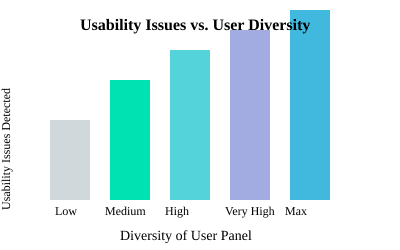
First, decide who matters. Your ideal test users should mirror your real audience. Age? Check. Experience level? Check. Hand size? Well, if your app’s buttons are so tiny they’d challenge a squirrel, maybe check that too. The more variety, the better. Research shows that apps tested with a diverse user panel (think: ages 18-65, from novice to expert) spot 30% more usability issues than those tested with a one-size-fits-all group. That’s not just a stat—it’s a usability lifesaver.
So, how do you actually recruit these unicorns? Start by defining your app’s user demographics. Are you building for tech-savvy teens, busy parents, or retired magicians? (Hey, everyone needs an app.) Next, cast a wide net: mix up ages, backgrounds, and experience levels. The more perspectives, the more real-world insights you’ll get. And don’t forget: representative users yield actionable feedback—not just “my cousin said it was fine.”
Now, let’s talk motivation. Would you pay your testers in pizza, gift cards, or app upgrades? If you had an unlimited budget, maybe all three. (Pro tip: pizza is universally loved, but gift cards don’t leave grease on the screen.) The point is, a little incentive goes a long way when you’re asking people to poke holes in your pride and joy.
“Testing with real users is like looking in the mirror—with better hair.” – Greg Thomas, App Product Manager
Remember, usability testing is only as good as your user recruitment. The more diverse your test scenarios and testers, the more likely you’ll catch those sneaky issues before your app hits the big time.
3. Task Design, Test Cases, and Why No One Reads Instructions
Let’s be honest: if you hand someone a set of instructions, there’s a 35% chance they’ll treat it like a Terms & Conditions pop-up—scroll, scroll, click, “I agree.” That’s not just a hunch; research shows only 65% of users actually follow test scenarios as written. The rest? Well, they’re the wild cards, and honestly, they’re the reason you discover your “U.S.-only” app suddenly needs to handle payments in pesos. (Yes, that happened. No, we’re still not over it.)
So, how do you design test cases that keep your sanity intact and your app robust? Start by breaking down your big, dreamy goals into small, specific tasks. Don’t just say, “navigate app.” Instead, go for “find nearest coffee shop,” or “share a cat meme with your grandma.” Realistic user flows are your best friend here.
Now, onto test cases. You’ll want a mix:
- Functionality test cases (can users log in, navigate, or buy that suspiciously cheap phone case?)
- Feature-specific test cases (does the filter button work, can you share to social, or does the dark mode actually turn things dark?)
- Edge cases (what happens if someone tries to pay in a currency you’ve never heard of, or uses a device last seen in a museum?)
Here’s a quick look at how these cases stack up:
| Test Case Type | Examples |
|---|---|
| Functional | Log in, navigate, complete purchase |
| Feature-Specific | Apply filters, share content, enable notifications |
| Edge Cases | Pay in pesos, use outdated device, rotate screen mid-checkout |
Remember, test scenarios are your roadmap, but your users? They’re the off-roaders. As Jessica Warren, Lead QA Engineer, so wisely put it:
“Users will always surprise you. That’s the whole point.”
So, embrace the chaos. Clear test cases and scenarios, especially those mirroring real user interactions, are pure gold for app development and optimization. But don’t forget: sometimes, the best insights come from the testers who gleefully ignore your instructions and try to pay for coffee with Monopoly money.
4. Remote vs. Lab Testing: Sweatpants or Suits?
Let’s face it: when it comes to mobile app testing, you’ve got two main vibes—lab testing (think: white coats, silence, and maybe a faint smell of sanitizer) and remote testing (think: sweatpants, barking dogs, and possibly a toddler demanding snacks mid-test). Both have their quirks, and both can make or break your usability testing strategy.
First up, lab testing. It’s all about control. You get to play mad scientist, tweaking the environment, monitoring every click, and making sure nobody’s phone is running on 2% battery. But here’s the catch: users tend to act like they’re at the dentist—way too proper. Suddenly, the person who rage-taps “Forgot Password” at home is politely reading every instruction and sitting up straight. Sure, you’ll catch some issues, but you might miss those “real-life” moments—like when someone tries to order pizza while juggling their phone, a cat, and existential dread.
Enter remote testing: the wild west of user behavior analysis. Here, users are in their natural habitat—on their couch, in a noisy café, or (if you’re lucky) testing your app with a beach WiFi connection that’s slower than dial-up. Remote testing mirrors actual user context, so you get to see how your app survives in the wild. Research shows remote setups spot 25% more unique issues than lab tests. That’s right: more bugs, more chaos, more genuine feedback. In fact, studies indicate that remote testing uncovers about 15 unique issues per session, compared to just 12 in the lab.
So, which is better? Well, here’s the wild card: you need both. Lab testing gives you the control to catch the obvious stuff, while remote testing unveils those “in the wild” surprises that make your app robust. As Ramon Clark, Mobile QA Lead, puts it:
“You want the truth? Test in their world, not yours.”
Bottom line: usability testing isn’t about choosing between sweatpants and suits—it’s about mixing both for a holistic view. Use lab testing for precision, remote testing for reality, and always, always expect the unexpected (and maybe a barking dog or two).
5. Analyzing Results Without Going Cross-Eyed
Congratulations! You’ve survived the wild ride of user testing, and now you’re staring at a mountain of data that looks like it could topple over and bury your sanity at any moment. But don’t worry—test results analysis doesn’t have to leave you cross-eyed, and you don’t need a PhD in statistics (or a sixth sense for user frustration) to make sense of it all.
First things first: mix your qualitative and quantitative user feedback like a pro chef. Sure, numbers matter—if it took someone 27 taps to find the “Log In” button, that’s a usability metric you can’t ignore. But don’t discount the power of a good old-fashioned “that was confusing” muttered by your test subject. As Audrey Kim, UX Researcher, wisely puts it:
“Data tells you what; user stories tell you why.”
So, start by balancing your gut feelings with cold, hard numbers. Look for patterns—are users consistently tripping over the same spot in your app? Is it your fault, or is the universe just playing tricks on you? (Spoiler: it’s probably your fault. But hey, that’s why we test.)
Now, let’s make things visual. Even if you’re not a chart enthusiast, a simple table can help you spot the top stumbling blocks at a glance. For example, if registration is the Bermuda Triangle of your app, you’ll see it right away:
| Usability Metric | Result |
|---|---|
| Average completion time per key task | 2.7 min |
| Most common stumbling block | Registration (42%) |
| Zero-bug sessions | Rare but celebrated |
Research shows that combining qualitative and quantitative data helps you prioritize UX improvements and guide future app updates. Spot repeated pain points for easy wins, and turn your findings into a prioritized fix list. And when you finally have a session with zero bugs? Throw a party (or at least treat yourself to a fancy coffee).
In the end, analyzing your test objectives and app performance isn’t about perfection—it’s about progress. Keep testing, keep listening, and remember: every confusing tap is just another step toward a smoother, friendlier app.
TL;DR: User testing for mobile apps isn’t rocket science, but it’s definitely not optional. With a dash of planning, a sprinkle of user empathy, and a heap of honesty, you can make your app not only usable but lovable. Make testing a habit, not an afterthought!
