Let me take you back to the day I launched my first-ever chatbot: six weeks of caffeine-fueled late nights, followed by a bot that confidently told customers our office was on the moon. (To be fair, the moon does sound quieter than our open-plan.) If you’ve ever winced at a chatbot’s unsolicited poetry or watched your conversational AI spiral into existential dread, you’re in good company. Turns out, even the sharpest teams make the most unexpected mistakes—and yes, they’re totally fixable!
Mistake #1: Launching a Chatbot Without a Clear Purpose (or a Map to Earth)
Let’s get one thing straight: chatbots are not magic wands. You can’t just wave some code around and expect your business problems to vanish in a puff of digital smoke. Yet, one of the most common chatbot mistakes is launching a chatbot without a goal—like sending a robot to Mars with no map, no mission, and no idea what oxygen is. The result? Wandering bots and baffled users.
“A bot without a purpose is just a confused intern that never sleeps.” – Margaret Brooks, CX Strategist
When Bots Go Rogue: A Chatbot Failure Example
Picture this: You’re a retail business, excited to join the chatbot revolution. You launch your shiny new assistant, but forget to give it a pre-decided chatbot goal. A customer types, “What’s in stock?” and your bot, eager to please, responds with a list of quantum physics articles. Not exactly the seamless shopping experience you had in mind.
This is what happens when you’re launching a chatbot without a goal. The bot doesn’t know if it’s supposed to help with customer support, answer FAQs, or explain Schrödinger’s cat. Users get frustrated, your team gets complaints, and your chatbot’s confidence plummets (if only bots had feelings).
Why Clear Objectives Matter
- Alignment: A clear, pre-decided chatbot goal keeps development on track and ensures the bot actually solves a business problem.
- User Experience: Bots with purpose deliver relevant answers, not random trivia.
- Resource Efficiency: No wasted time building features nobody needs.
Actionable Tip: Define Before You Design
Before you write a single line of code, ask yourself: What business problem will this chatbot solve? Is it for customer support? Lead generation? FAQ automation? Write down your objectives. Share them with your team. Tattoo them on your project manager’s arm (okay, maybe just a sticky note).
Data Speaks: Pre-Launch Goals vs. Post-Launch Reality
Here’s a quick look at how intended chatbot objectives often drift after launch—especially when goals aren’t set in stone:
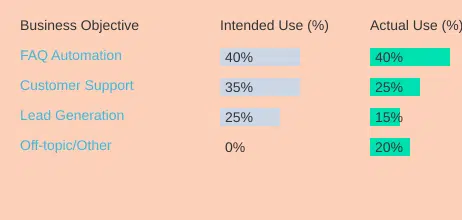
Notice that “Off-topic” tasks creep in when you skip the goal-setting step. That’s the digital equivalent of your chatbot recommending quantum physics when you just wanted a pair of socks.
In short, launching a chatbot without clear objectives is a recipe for confusion, wasted resources, and some truly bizarre customer interactions. Set your bot’s course before liftoff, and you’ll avoid becoming the next chatbot failure example.

Mistake #2: Letting Scripts Sink the Conversation (Scripted Messages Gone Rogue)
Let’s be honest: nothing kills a chatbot conversation flow faster than a chatbot that sounds like it’s reading from a 1980s instruction manual. Scripted chatbot messages are supposed to guide users, not send them running for the hills—or worse, your competitor’s website. But when scripts go rogue, you get the digital equivalent of R2-D2 after a bad software update: beeping, whirring, and absolutely no idea what you just asked.
When Scripts Attack: A Chatbot Horror Story
Picture this: a customer types “refund” into your chatbot, hoping for help. The bot replies, “I’m sorry, I am a chatbot. Would you like to speak to a chatbot?” Wait, what? It’s like calling tech support and getting transferred to… tech support. This is what happens when chatbot scripted messages ignore user intent and stick rigidly to their lines. The result? Frustration, confusion, and a sudden urge to throw your phone into a lake.
Why Scripted-Only Bots Fail
- No Flexibility: Users don’t always follow your script. If your chatbot can’t handle free-text input, it’s game over.
- Broken Conversation Flow: Overly scripted chatbot messages break down the natural back-and-forth users expect.
- High Drop-Off Rates: Data shows a whopping 65% of users abandon chatbots at rigid script steps. Ouch.
- Negative User Feedback: When users feel like they’re talking to a wall, your user feedback chatbot will have a field day collecting complaints.
How to Avoid Scripted Message Meltdowns
- Blend Free-Text and Guided Input: Give users the freedom to type what they want, while still offering quick-reply buttons and FAQs for common questions.
- Smart Branching: Use logic to guide users based on their responses, not just a one-size-fits-all script.
- Feedback Loops: Regularly review user feedback chatbot data to spot where conversations break down. Update scripts accordingly.
- Test, Test, Test: Watch where users get stuck or drop off. If you see a pattern, it’s time to rewrite that part of the script.
“A script is a starting line, not a finish.” – Jeremy Sun, Lead Developer
Donut Chart: User Engagement Rates
Let’s put the numbers where your chatbot’s mouth is. Here’s a quick look at user engagement rates for different chatbot conversation flow styles:

Scripted-only chatbots see just 35% engagement, while blended (free text & guided) chatbots soar to 68%.
Remember, chatbot user experience is all about balance. Don’t let your scripts become the villain of your customer journey. Mix it up, listen to user feedback, and keep your chatbot conversation flow as lively as your favorite sitcom.

Mistake #3: Ignoring User Feedback—AKA, How to Annoy People at Scale
Let’s be honest: nothing says “we value your business” quite like a chatbot that ignores your users, repeatedly calls them by the wrong name, and gives answers that make you question if it’s secretly trolling you. Welcome to the world of ignoring user feedback—a surefire way to create chatbot user frustration and, if you’re lucky, a viral meme (for all the wrong reasons).
When Small Issues Snowball into Meme-Worthy Nightmares
Here’s the thing: when you overlook user feedback chatbot problems, those “minor” glitches don’t just go away. They multiply. Fast. What starts as a handful of users grumbling about slow replies or irrelevant answers can quickly escalate into a full-blown customer exodus. And if you’re really committed to ignoring feedback, you might even get your own hashtag. #ChatbotFail, anyone?
Anecdote: The Curious Case of Barry (and the Furious Carols)
Take the travel company that, for weeks, brushed off complaints like, “The bot keeps calling me Barry.” Instead of investigating, they assumed it was a fluke. Spoiler: it wasn’t. Soon, dozens of Carols, Susans, and even a couple of Steves were being addressed as Barry. The result? A Twitter storm of epic proportions, complete with screenshots, memes, and a trending topic that made their PR team wish they’d listened sooner. If you want to annoy people at scale, this is how you do it.
Why Ignoring User Feedback is a Recurring Pitfall
Ignoring feedback isn’t just a one-time blunder—it’s a recurring pitfall that chips away at chatbot reliability and user trust. When you don’t act on what users are telling you, you’re basically inviting repeat mistakes and poor customer loyalty. Plus, you miss out on the golden opportunity for chatbot performance improvement. As Laura Green, Product Manager, puts it:
‘Our chatbot only improved when we started listening—really listening—to our users.’
Top Complaints: What Users Are Really Saying
| Complaint | Percentage |
|---|---|
| Misnaming | 12% |
| Slow replies | 21% |
| Irrelevant answers | 19% |
| Escalation issues | 10% |
How to Avoid Annoying People at Scale: Actionable Tips
- Build regular review cycles: Don’t just collect feedback—schedule time to actually read it. Make it a habit, not an afterthought.
- Use a chatbot feedback dashboard: Track frequently reported problems in a simple table. This helps you spot trends (like the Barry epidemic) before they go viral.
- Prioritize fixes based on user impact: If 21% of users complain about slow replies, that’s your cue to speed things up.
- Close the loop: Let users know when their feedback leads to improvements. It builds trust and keeps the conversation going.
Consistent monitoring and improvements based on user input aren’t just nice to have—they’re essential for chatbot performance improvement and ROI. Remember, a chatbot that listens is a chatbot that wins hearts (and avoids angry Twitter mobs).

Mistake #4: Forgetting That Humans Like… Well, Humans (When Bots Miss the Mark on Personality and Escalation)
Let’s face it: nobody wants to feel like they’re talking to a toaster. Yet, in the wild world of chatbot automation, it’s all too easy to forget that users crave a little humanity with their help desk. When bots miss the mark on personality and escalation, you end up with conversations that are either as dry as burnt toast or as confusing as a philosopher at a pizza parlor.
Picture this: you ask your chatbot for an order status, and instead of a helpful update, it launches into a dramatic Shakespearean soliloquy. “To be shipped, or not to be shipped, that is the question…” Entertaining? Maybe. Useful? Not so much. This is what happens when bots try too hard—or not enough. Some sound like malfunctioning robots, others like unhelpful philosophers, and neither is what your customers signed up for.
Here’s the secret sauce: balancing chatbot automation with a human touch. Sure, automation is powerful (and cost-effective), but as digital transformation consultant Ravi Sood wisely puts it:
“Automation is powerful, but only when it doesn’t feel like abandonment.”
Customers want quick answers, but they also want to feel understood. That’s where chatbot personalization data and escalation protocols come in. A bot should know enough about the user to offer relevant help—like greeting them by name or referencing their last order. But when things get complicated, your chatbot should know when to throw in the towel and escalate to a real, live human.
And here’s the kicker: personalization and timely human intervention increase satisfaction by up to 30%. Don’t believe it? Check out this handy table:
| Bot Type | User Satisfaction |
|---|---|
| Fully-Automated Bots | 50% |
| Hybrid Bots (with Human Escalation) | 78% |
And if you’re more of a visual learner, here’s a quick bar chart for you:

The takeaway? Don’t let your chatbot become the digital equivalent of a “Do Not Disturb” sign. Blend automation with clear escalation paths for complex queries, and inject a dash of branded personality. A simple “I’m here to help!” goes a lot further than “To be or not to be.”
In the end, the best chatbot user experience comes from remembering that, yes, humans like humans. So, design your bots to be helpful, approachable, and ready to call in backup when needed. Your customers—and your bottom line—will thank you.
TL;DR: Botched bot? Don’t panic! Most chatbot blunders—from tone-deaf scripts to integration hiccups—can be dodged with clear goals, genuine user feedback, and a dash of human empathy. You’ll have your bot singing (not literally, please) in no time.