
Let me tell you about the time my cousin’s homemade soap shop missed a viral Instagram moment because her site loaded slower than a snail on vacation. Sound familiar? With Google sniffing out every sluggish webpage like a cyber bloodhound, Core Web Vitals isn’t just tech lingo—it’s bread and butter for your site’s survival. But fear not: this isn’t another snooze-fest. We’ll laugh, learn, and yes, maybe wince at a few web bloopers as we boost your pages into the digital fast lane.
Metric Mayhem: Decoding Core Web Vitals in Plain English
Let’s face it: Core Web Vitals metrics sound like something you’d need a PhD in “Internet Sorcery” to understand. But don’t worry—no wizard robes required. We’re breaking down Largest Contentful Paint (LCP), Cumulative Layout Shift (CLS), and Interaction to Next Paint (INP) with zero jargon, a dash of humor, and a healthy respect for your sanity.
Largest Contentful Paint (LCP): Because Nobody Likes Staring at a Blank Page
Imagine clicking a link and waiting… and waiting… and waiting for the main image or headline to show up. That’s LCP: the time it takes for the biggest thing on your page to actually appear. If your LCP is slower than your grandma’s dial-up, users will bounce faster than a rubber ball in a tile hallway. Research shows that delays here can send your bounce rate through the roof. Google’s target? Under 2.5 seconds. If you’re over, it’s time to compress those images, lazy-load below-the-fold content, and maybe bribe your server with a nice cup of coffee.
Cumulative Layout Shift (CLS): The Button That Got Away
You know that moment when you’re about to click “Buy Now” and—bam!—the button jumps, and suddenly you’ve bought a llama instead of a laptop? That’s Cumulative Layout Shift (CLS) in action. It measures how much stuff moves around on your page as it loads. Too much shifting, and your conversions will run for the hills. The magic number: less than 0.1. Pro tip: define image and ad dimensions in your code, and never, ever insert banners above content that’s already loaded. Studies indicate that fixing CLS can boost conversions and keep your users’ blood pressure in check.
Interaction to Next Paint (INP): The New Kid on the Block
Say goodbye to FID (First Input Delay) and hello to Interaction to Next Paint (INP). INP is all about how quickly your site responds when a real, live human tries to interact with it. No more passing the “robot test”—this is about actual user experience. Google’s new darling wants your INP to be under 200 milliseconds. If your site responds slower than a sloth on a lazy Sunday, it’s time to optimize those scripts and streamline your code. As Aleyda Solis puts it:
“Optimizing for INP puts the focus on what users actually feel, not just what bots record.”
Why Should You Care? (Besides Not Wanting Angry Users)
- Core Web Vitals metrics are now Google ranking signals. Ignore them, and your SEO dreams may end up in the digital dumpster.
- Only 47% of websites pass Core Web Vitals as of 2025. That means over half of the web is still stuck in the slow lane—plenty of room for you to zoom ahead.
- Improving LCP, CLS, and INP isn’t just for robots. Research shows it can boost conversion rates by up to 20% and slash bounce rates. Not bad for a few tweaks!
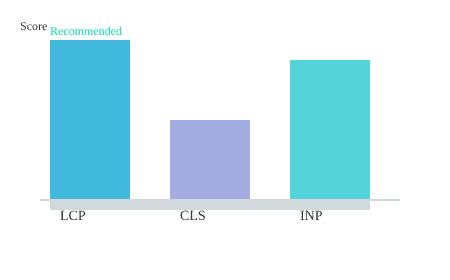
So, if you want to avoid Core Web Vitals issues and keep both Google and your visitors happy, start by taming these three metrics. Your rankings—and your users’ sanity—will thank you.

Tales from the Trenches: Quirky Ways to Turbocharge Site Speed
Ready to become the pit crew chief of your own website? Buckle up, because site speed optimization techniques aren’t just for the tech elite—they’re for anyone who’s ever screamed at a slow-loading page (so, all of us). Let’s pop the hood and see what really gets your Core Web Vitals purring, minus the tears and existential dread.
Act Like a Web Mechanic: Compress, Lazy Load, and Ditch the Junk
Imagine your website as a racecar. Would you fill the trunk with bowling balls (a.k.a. uncompressed images and videos) and expect to win? Of course not! Optimize images and videos by compressing them—research shows this can reduce your Largest Contentful Paint (LCP) by a whopping 30-40%. That’s like swapping out your car’s concrete tires for something that actually rolls.
Next up, embrace lazy loading. Why make your site serve up every image at once when you can serve them just-in-time, like a fancy restaurant? Implementing lazy loading can cut load times by 20%. Your users will think your site’s on rocket fuel, and you’ll finally beat your arch-nemesis: the spinning loading icon.
Hosting Heartbreaks: My Cyber Monday Meltdown
Let me tell you about the time my site nearly flatlined on Cyber Monday. Picture this: visitors flooding in, shopping carts filling up, and suddenly—my server’s slower than a dial-up connection in 1998. Turns out, server response times are the silent site killers. As Barry Schwartz wisely put it:
‘Server response time is your silent site killer. Speed it up, and everything else falls into place.’ — Barry Schwartz
Upgrading my hosting was like swapping out a hamster-powered engine for a V8. Studies indicate that a hosting upgrade can boost load speed by up to 50%. Toss in a little database tuning, and you’ll be lapping the competition before they even leave the pit.
The Render-Blocking Riddle: Scripts and Critical CSS
Ever wonder why your site hesitates, like it’s deciding whether to load or take a nap? Blame render-blocking resources, especially those bloated scripts and non-critical CSS. Here’s a quirky trick: defer non-essential JavaScript and inline only the CSS you need right away (a.k.a. critical CSS). It’s like telling your site, “Hey, just wear the essentials—pants optional.”
Deferring scripts is often the secret sauce for instant speed boosts. Plus, minimizing render-blocking resources is a direct line to happier Core Web Vitals scores and better rankings. Research shows only about 47% of sites currently pass Core Web Vitals, so you’ve got a golden opportunity to zoom ahead.
SVG Chart: Site Speed Optimizations vs. Core Web Vitals Pass Rate
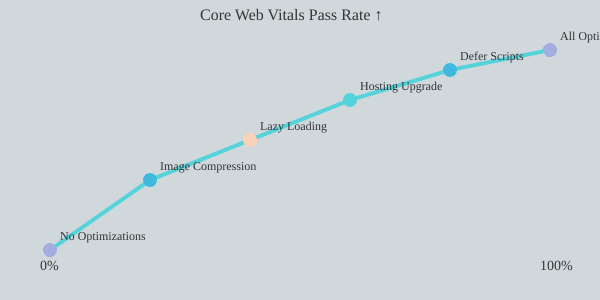
So, whether you’re compressing images, tuning your server, or playing whack-a-mole with render-blocking scripts, remember: every tweak is a turbo boost for your rankings and user experience. Now, go forth and optimize—pit crew jumpsuit optional.

From Agony to Ecstasy: Turning Frustrated Clicks into Happy Users (& Higher Rankings!)
Let’s be honest—nobody wants to babysit a website that loads slower than a dial-up connection in 1998. If your visitors are clicking, waiting, and then rage-quitting before your homepage even blinks to life, you’ve got a user experience problem (and, let’s face it, Google’s not going to send you any love letters either). Welcome to the wild world of user experience and Google rankings, where every millisecond counts and every layout shift is a potential mood-killer.
Real User Feedback: The Humans Have Spoken (and Clicked… and Bounced)
Here’s the cold, hard truth: it’s not bots who decide your fate in the search results. It’s real, living, breathing humans—armed with opinions, short attention spans, and a hair-trigger bounce reflex. Research shows that monitoring real user data (not just those fancy simulated lab tests) is the secret sauce for user experience improvement strategies. Sites that actually listen to their users (and not just their developers’ egos) consistently outperform the competition. It’s like having a focus group, but with more honesty and less free pizza.
Core Web Vitals: The Bouncer at Google’s Nightclub
Imagine Google’s top 10 rankings as the hottest club in town. Core Web Vitals is the bouncer with a clipboard and a no-nonsense attitude. If your site fails the dress code—think slow Largest Contentful Paint (LCP), jumpy Cumulative Layout Shift (CLS), or sluggish Interaction to Next Paint (INP)—you’re not getting in. No amount of sweet-talking will help. As Lily Ray puts it:
‘A happy user is your best SEO weapon—Web Vitals just give you a cheat sheet.’ — Lily Ray
Translation: If your site gives users what they want (fast, stable, and frustration-free browsing), Google will reward you with velvet-rope access to higher rankings.
Bounce Rate Reduction & Conversion Rate Improvement: The Instant Glow-Up
Here’s where things get spicy. Studies indicate that Web Vitals improvements can chop bounce rate and increase conversions by 20% or more. That’s not just a stat—it’s a lifeline for your business. Taming layout shifts (by defining ad, media, and image sizes) keeps your site serene and your visitors happy. And when users stick around, they’re more likely to convert, subscribe, or—dare we say—buy something.
- Define image and ad dimensions to stop content from jumping around like a caffeinated squirrel.
- Regularly audit your site and link Google Analytics with Core Web Vitals tracking to see real business impacts.
- Monitor real user data to catch issues before your bounce rate skyrockets.
Table: Core Web Vitals Impact at a Glance
| Metric | Impact |
|---|---|
| Strong Core Web Vitals | 20%+ higher conversion rates |
| Tamed Layout Shifts | Lower bounce rates |
| Real User Data Monitoring | Outperforms synthetic tests |
So, if you want to go from agony (frustrated clicks and plummeting rankings) to ecstasy (happy users and a spot in Google’s VIP lounge), start with real user monitoring, layout stability, and a dash of analytics magic. Your users—and your bottom line—will thank you.

Core Web Vitals War Stories: Worst Fails, Best Fixes (And a Cheat Sheet)
Let’s be honest: if you’ve ever tried to optimize your site for Core Web Vitals, you’ve probably experienced at least one “why is my CLS still red?!” meltdown. You’re not alone. Core Web Vitals best practices are like gym routines—everyone talks about them, but most of us just want to skip leg day. But fear not! This section is your Technical SEO guide 2025, minus the tears and existential dread.
First, let’s talk about the classic fails. You know, the ones that haunt your Google Search Console like a bad haircut in your yearbook. Layout shifts (CLS) from surprise banner ads, images that load like they’re on dial-up, and JavaScript that blocks your site like a bouncer at a VIP club. Research shows that only about 47% of websites pass Core Web Vitals assessments—so if you’re struggling, you’re in good (if slightly panicked) company.
But here’s the good news: most Core Web Vitals issues have surprisingly simple fixes. For example, pre-defining image and ad slot dimensions can cut unexpected layout shifts by a whopping 90%. That’s right—just tell your images how big they’ll be, and your CLS score will thank you. Database query tuning? It’s the secret weapon for complex sites, slicing seconds off your load times faster than you can say “performance budgets and thresholds.”
Speaking of budgets, let’s address the elephant in the server room. Performance budgets aren’t just for Fortune 500 companies—they’re for anyone who wants to stop panic-optimizing every quarter. Studies indicate that setting realistic budgets can reduce development cycles by up to 30%. Imagine all the extra time you’ll have to, I don’t know, actually enjoy your coffee instead of doom-scrolling through Lighthouse reports.
And here’s where things get fun. Picture Google as your strict gym coach. Every second you shave off your site’s load time, you earn another pushup of rank. (And trust me, Google never skips leg day.) Regular audits—think of them as your quarterly fitness check—keep you and your site in shape. Research shows that sites with regular audits have happier users and, yes, even happier developers. Because nothing says “job satisfaction” like a green Web Vitals dashboard.
| Fix | Impact |
|---|---|
| Performance Budgets | Reduce dev cycles by up to 30% |
| Pre-sized Images | Cut layout shifts by 90% |
| Quarterly Site Audits | Happier users & developers |
So, what’s the real secret to mastering Core Web Vitals issues? It’s not a crash diet of last-minute fixes. As Marie Haynes wisely put it:
‘Treat Core Web Vitals as your site’s fitness plan, not a crash diet.’ — Marie Haynes
In the end, the best Technical SEO guide 2025 isn’t about chasing every new metric or panicking over every red flag. It’s about setting smart performance budgets, running regular audits, and tackling the easy wins (like pre-sizing your images and tuning your database). Do that, and you’ll not only survive the Core Web Vitals war—you’ll thrive, one pushup (and ranking boost) at a time.
TL;DR: You don’t need a PhD in Geekology to win at Core Web Vitals. With practical tweaks—think image magic, script wrangling, and real user checks—you’ll load faster, keep visitors smiling, and watch your Google rankings climb. Faster site, happier users, better business: it’s that simple.